## Overview
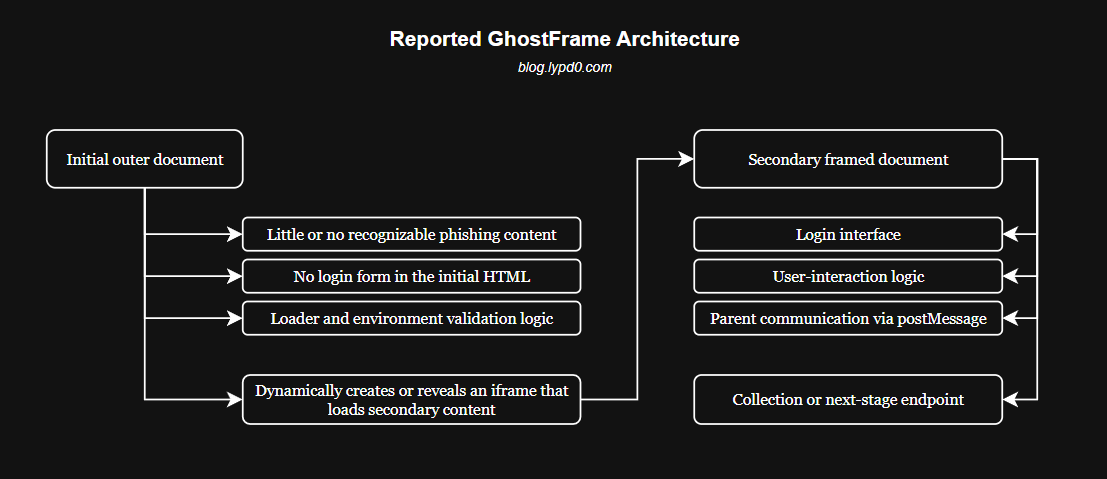
In late 2025, [Barracuda documented GhostFrame](https://blog.barracuda.com/2025/12/04/threat-spotlight-ghostframe-phishing-kit), a phishing framework built around a simple but effective idea: the first page a victim visits does not need to contain the phishing interface at all.
Instead, the initial document acts mainly as a loader, bringing a separate login page into view through an iframe. That separation allows the visible content and interaction logic to live elsewhere, while the outer page handles tasks such as environment checks and communication through `window.postMessage`. As a result, a scanner that inspects only the initial HTML response may miss the part of the page that actually matters.
## Recreating the Core Idea
To make the technique easier to understand, I created a small proof of concept called [GhostFrame-Phishing](https://github.com/lypd0/GhostFrame-Phishing). It uses a fictional social platform named **Bookface** and keeps the project deliberately simple: two HTML files and no backend server.
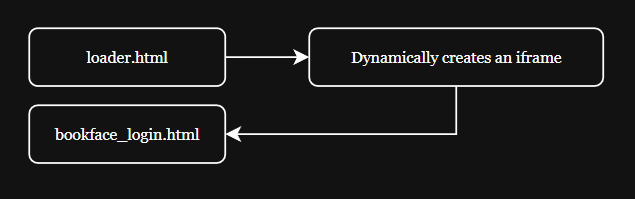
The first file, `loader.html`, represents the initial document. It contains no login form, password field, or Bookface branding. Its only relevant job is to create an iframe and load the second file:
```javascript
const frame = document.createElement("iframe");
frame.src = "bookface_login.html";
frame.title = "Bookface login";
frameHost.replaceChildren(frame);
```
The actual login interface lives entirely inside `bookface_login.html`. This means that inspecting only the source of the initial document does not reveal the form eventually shown in the browser.
## Passing Data Between the Documents
After the user submits the fictional Bookface form, the framed document sends a message to its parent using `window.postMessage()`:
```javascript
window.parent.postMessage({
type: "BOOKFACE_LOGIN",
payload: {
email,
password,
capturedAt: new Date().toISOString()
}
}, "*");
```
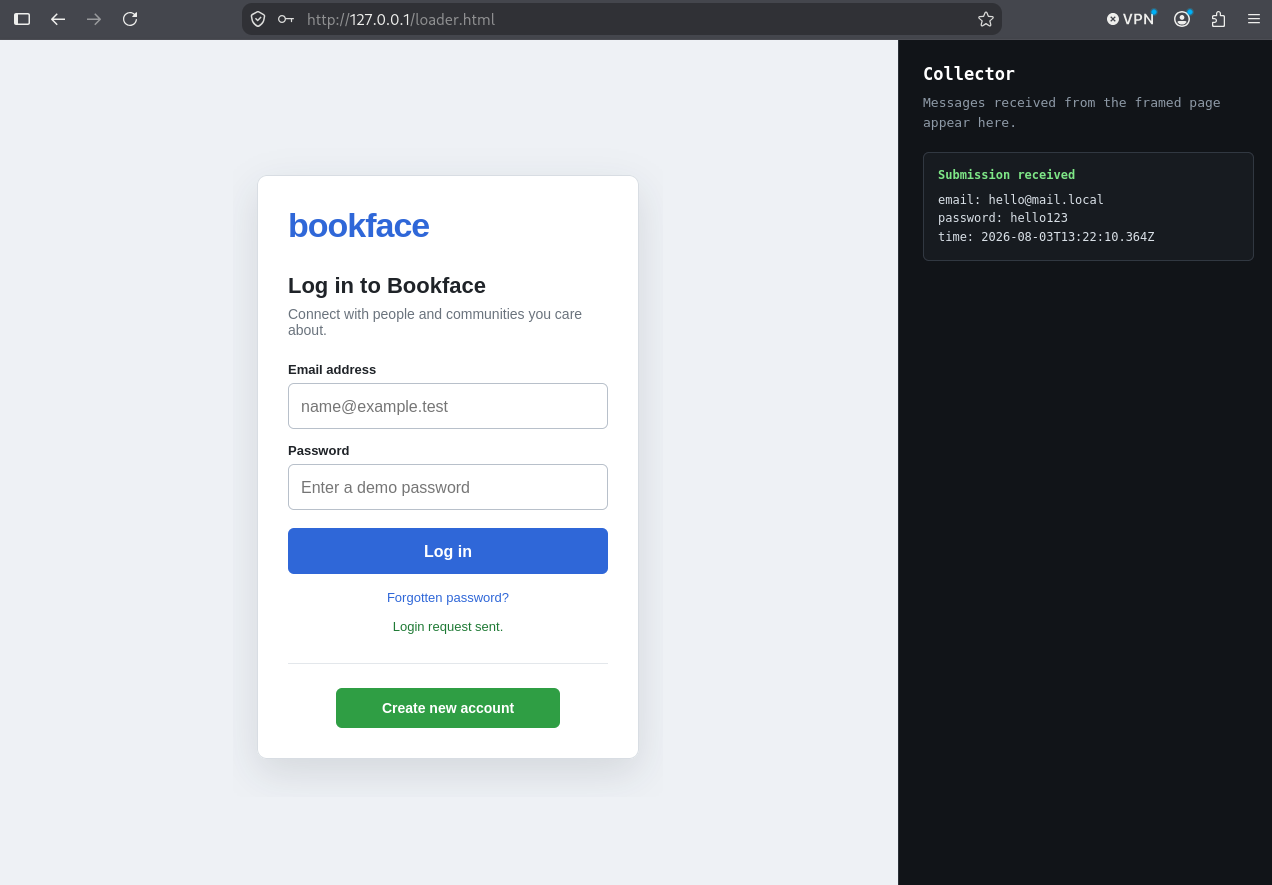
The outer document listens for that message and displays the submitted values in a visible collector panel:
```javascript
window.addEventListener("message", event => {
if (event.source !== frame.contentWindow) {
return;
}
if (!event.data || event.data.type !== "BOOKFACE_LOGIN") {
return;
}
const payload = event.data.payload;
});
```
Nothing is sent to a remote endpoint. The collector exists only to make the movement of data between the iframe and its parent visible during the demonstration.
In a real application, both documents should validate the exact expected origin rather than use `"*"` as the destination. The wildcard is used here only to keep the local demonstration easy to run.
## Running the Project
Clone the repository and enter its directory:
```bash
git clone https://github.com/lypd0/GhostFrame-Phishing
cd GhostFrame-Phishing
```
Start a local HTTP server:
```bash
python3 -m http.server 8000
```
Then open:
```text
http://127.0.0.1:8000/loader.html
```
The page displays the framed Bookface login interface alongside the collector. After dummy values are submitted, they are passed to the outer document and shown locally.
## What the Demonstration Proves
The important part is not the appearance of the fictional login page. It is the separation between the document initially inspected and the content eventually rendered.
A scanner that examines only `loader.html` will not find:
- a password field
- a login form
- Bookface branding
- the login-page styling
- the interaction logic contained in the secondary document.
To understand what the user actually sees, the scanner must execute the loader, follow the iframe destination, retrieve the secondary response, and inspect the resulting runtime behavior.
Of course, this was a rather simple example, which can be improved, but this is the main GhostFrame concept reproduced by the project. [Barracuda's original analysis](https://blog.barracuda.com/2025/12/04/threat-spotlight-ghostframe-phishing-kit) also describes additional capabilities such as changing subdomains, environment validation, fallback frames, parent-page manipulation, Blob-backed visual states, and double buffering, which I did not add in this example.